Stage from anywhere
Select files in Finder and add them to the Shelf. Mix sources from as many folders as you need.
⌃⌥S FinderCraft
The native companion for staging and moving files in Finder.
Keep files from any folder on a Shelf that stays with Finder, then move them into the window you already have open. Every rename, compare, and cleanup tool is a click away, without replacing Finder.
$2.99. One purchase. No subscription.
Stage from any folder. Keep every source within reach at once.
Move into the open window. No dragging across Spaces or displays.
Repeat the last transfer. Same files, same place, one shortcut.
Save a Shelf as a set. Restage a whole project in a click.
See it in action
Every clip and screenshot here is the shipping app on a real Mac, not a mockup.
The move
FinderCraft remembers the files. Finder remains free to go find the destination.
Select files in Finder and add them to the Shelf. Mix sources from as many folders as you need.
⌃⌥SNavigate tabs, windows, favorites, search results, or another display. The staged set does not move.
Move or copy the set into the open folder, verify the result, and undo when it can be done safely.
⌃⌥DEvery FinderCraft tool
Stage, move, rename, compare, organize, tag, archive, and recover - without switching to another file manager.
Stage files and folders from unrelated locations, keep navigating, then move or copy them into the Finder folder that is open now. Finder cannot hold a set of files aside while you browse. FinderCraft can.
Send the staged set straight into the frontmost Finder folder, no dragging across Spaces, tabs, or displays to find the destination.
Send the same files to the same destination again with one shortcut, so a move you make every day stops being a chore.
Keep a recurring group of files as a named set and restage the whole group in a single click whenever you come back to it.
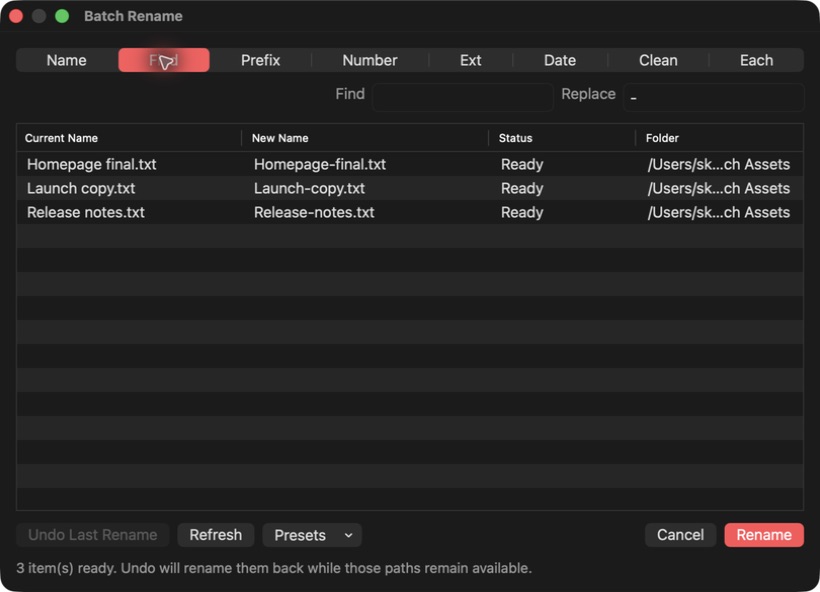
Find and replace, numbering, dates, cleanup, EXIF capture dates, and per-file names - all visible before anything changes.
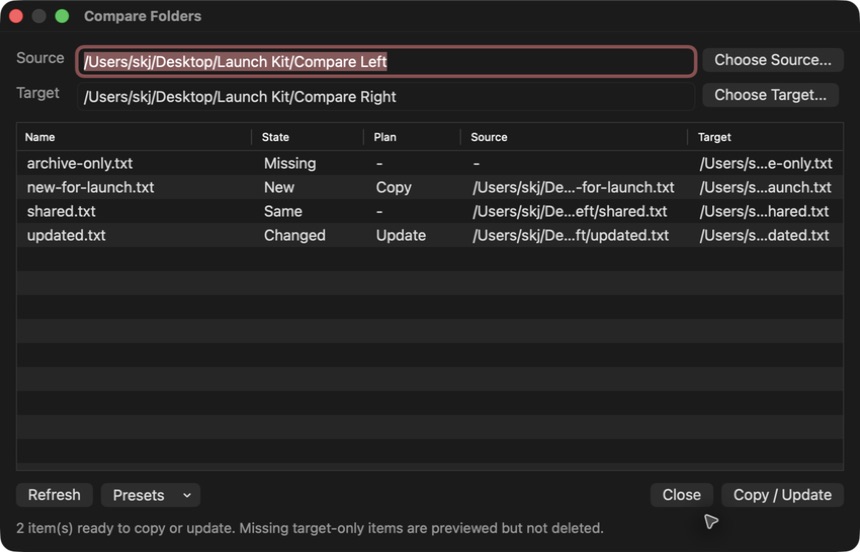
Review new, changed, same, missing, and mismatched items across two folders. Copy only the changes you explicitly approve.
Tidy screenshots, images, documents, archives, audio, video, and code into clear folders without building a second file library.
See what FinderCraft changed, retry skipped work, reveal results, and undo moves or created copies only when it is safe.
Native by design
FinderCraft lives in contextual menus, an attached Shelf, and focused native panels. No Dock app. No drive indexing. No second workspace to maintain.
Launch edition
Every FinderCraft tool. One purchase. Updates for the purchased major version.
$2.99
one-time purchase · no subscriptionDetails
No. Finder stays where you browse, preview, search, tag, and manage files. FinderCraft adds a Shelf and focused tools around the Finder windows you already use.
No. FinderCraft is a one-time $2.99 purchase. No subscription, and it stays yours.
File operations happen locally on your Mac. FinderCraft previews risky changes, never silently overwrites by default, records its own operations, and offers conservative undo where the prior state is known.
FinderCraft requires macOS 14 (Sonoma) or later and runs on both Apple silicon and Intel Macs. It is a direct download that uses Apple-supported Finder extension APIs.